



In a most unusual move, Meta has decided to update its flagship Windows desktop application as a web-based viewer, thereby making it slower, bigger, more memory intensive and worse in just about every way. And to top it off, Meta will just force you to use this new version.
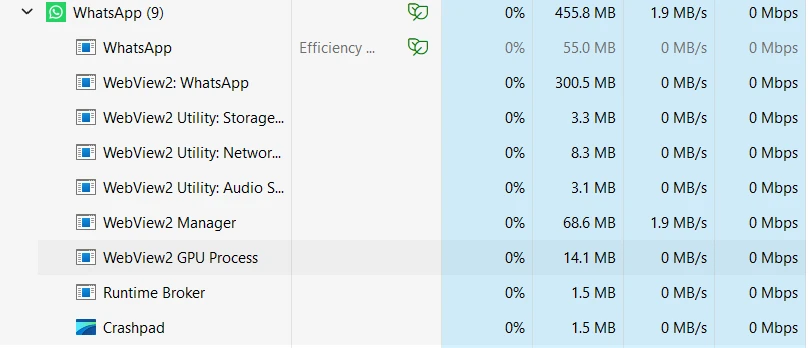
And this thing is a monster. Just running it (and by default it wants to run in the background), it uses 500 MB of RAM and can easily can grow over 1 GB. others have commented on how bad this new version is from a memory standpoint. And, wow, I can confirm it. I don’t see any updates from Meta on their rationale for this stupid move, but it may be just about the money (just make one single web interface – less developers).

The older WhatsApp, it uses a paltry 118 MB of RAM while running:


The old WhatsApp had its fair share of issues too. There were numerous problems with sending large video files, sending a YouTube link while also including an image would often crash the application. This program was not perfection, but damn it was no dog on the system. It was reasonable in terms of resource usage.
Some of the most frustrating parts of this upgrade downgrade are the small infuriating changes to menus. The individual chat right-click menu just rearranges all of the options. So now when I want to close a chat, my muscle memory takes me to deleting it. They didn’t need to make this a CAPTCHA-like process to see if I’m paying attention, only to piss me off.


You can delay this inevitable enshittification of Whatsapp on Windows by pausing updates in the Windows Store1. This will only last so long before you too are forced backwards. It may be better for all of us if we just use the Whatsapp web interface and move on. It’s almost the end of 2025 and I have still managed to keep one computer from updating.
- One trick that works too: Unpause updates, let Store find what’s new then immediately cancel the Whatsapp download. Update everything else to stay current and then pause everything again. ↩︎