


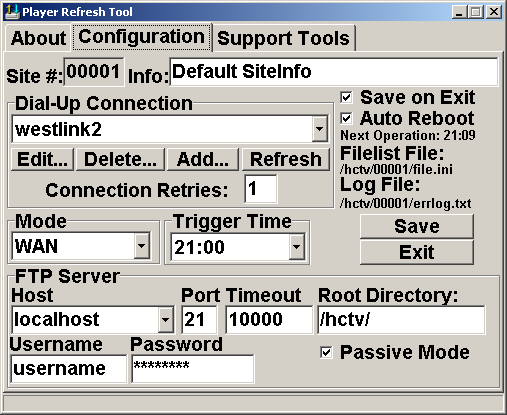
Digging through the vault of older CWL software, I came across a utility that I’d created in, oh, 2003, with a plan to sell it. That never happened, but the tool was still a thing and I’d spent hours coding and testing. Today, let’s look at what the program did looked like. If there’s a way to provide it freely and someone out there is interested, I’ll will make it downloadable (let me know). The program itself is a bit dated but also still works if you have nodes that need to sync.
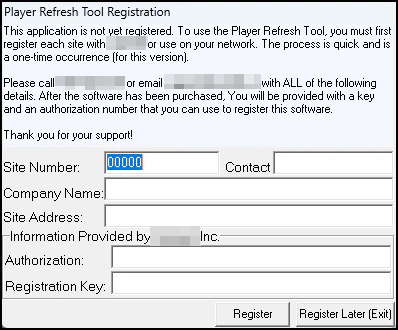
This program was the first that I’d ever create a registration process for. On starting Player Refresh Tool, you needed to enter a key. I’m not sure I recall how these keys were generated, but it was likely that they’d be checked locally and not activated online. If no valid key was provided, the application would exit forcefully.

Player Refresh Tool’s Purpose:
A player computer requires updates to a presentation that is played back on a number of computers. The player needs to pull these updates from a central location. The Player Refresh Tool controls the updating of the presentation (files) by some means of automatic transfer. The Player Refresh Tool has the following characteristics (a) automated retrieval of files on a fixed schedule (b) Administrable remotely (by which, the content of the update would be controlled remotely) (c) robust logging of file transfers and and some means of management (d) the ability to schedule reboot to enhance reliability1 (e) Version control. Additionally, the application is 32bit on the Windows platform.
Main Features:
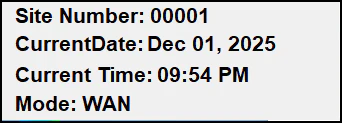
Startup Information: When the Player starts, information about the site version, operating mode, date and time show for a short time while the presentation manager loads (such as Scala). This feature allows support personnel to assess the configuration of a Player system at a glance. This feature tends to reduce the number of times a computer needs to be rebooted.

FTP Server: The Player Refresh Tool includes a built-in, secure FTP Server that gives the Administrator of the network full access (list, download, upload, rename) on the Player Computer’s hard disk. This feature with appropriate port forwarding and network access would allow the network manager directly modify the device’s drive, if needed.
LAN Mode: The Player Refresh Tool now includes a LAN mode that bypasses the need for a Dial-Up modem. This new mode allows the Player computers to be used over broadband, in corporate settings or other times when Dial-Up is not required. This feature allows the customer to use the Player in markets that may have previously been restricted.
Internet Time Setting: While processing the download, the Player Refresh Tool can set the time on the local computer using public Internet servers. This feature will improve the reliability of reported data and diagnostic tools while saving support time and costs.
Interface Enhancements: The Player Refresh Tool now sports an improved interface making the window readable in high contrast, plasmaTV, and televisions much easier. This feature reduces support times drastically by allowing the support personnel to see and read the screen from a distance; even on a television. Combined with keyboard enhancements, the vast majority of systems can now be supported merely with the use of a keyboard and a keyboard extension cable.
.
Uploading Files: The Player Refresh Tool can upload files (From the Player Computer to the server) based on a setting in a configuration file. This provides a proactive and useful method for identification of viruses or to troubleshooting playback or configuration problems, without the need to physically be on location.
Alternate Dial-Up Number: If present, an alternate Dial-Up connection can be used to dial up to the Internet and get new Dial-Up configuration settings. This option allows Player computers to recover from a Dial-Up number changes, configuration changes or server movements making your network more resilient to points of failure.
Domain Name: In addition to supporting an alternate Dial-Up connection, the Player Refresh Tool also supports the use of a hostname for connecting to the FTP server. This allows the server to have its IP address change while the Player resolves the new one.
HotKey Support: The Player Refresh Tool supports the use of a hotkey combination CTRL+ALT+F11 that opens the Player Refresh Tool and thus removes the requirement for a mouse attached to the client computer. The Player Refresh Tool also minimizes with the use of the ESC key. This has been proven to dramatically reduce the time needed to service computers in the field.
File Check: Player Refresh Tool now checks the server first before attempting to download the file. Without these checks, the download may be disrupted if an incorrect filename is encountered. This feature greatly improves the reliability of downloads.
Location Information: Location information is included in the application to assist in the servicing the systems. All location information is passed in the log file and displayed in Site-UP or the Site Management System. This information can be used for local persistent information (dial-up numbers, prefixes, etc.) or to improve site-level awareness.
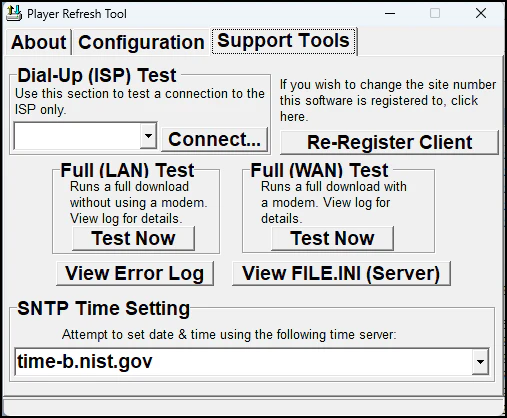
Support Tools: A number of support tools have been added to assist in the diagnosis of problems while a service person is on-site, these include:
– A full Player Refresh can be processed with a Dial-Up connection
– A full Player Refresh can be processed without a Dial-Up Connection
– A Dial-Up Connection to the ISP can be tested
– The support person can directly open the local log file
– The support person can directly view the FILE.INI off the server (requires connection)
These tools augment and speed up the process of analyzing and testing problems on a system. Based on actual experience in the field, the use of these tools can cut the support time by as much as half (compared to using built-in Windows tools) while making the testing environment consistent on different computers and Operating Systems.

Update Randomization: The connection process will run at a random period of time (between the trigger time and one hour past). This means that a Player set to connect at 12am will connect at a random time between 12am and 1am. This process balances the load on Dial-UP systems and FTP servers, as well as improving the reliability of downloads.
Messaging Subsystem: In addition to being able to actively upload files, there will be a designated directory (C:\plrmessage) that the Player Refresh Tool will automatically send text files to the server. This will be the means of an active message transport system that can be used by applications that monitor the Player’s health. This feature will take the network from a reactive state and provide it with a more more powerful proactive ability.
Updates: The Player Refresh Tool keeps itself updated continuously by checking for newer versions of the application and downloading in the background if necessary.
Reboot: The reboot.exe utility has been redesigned to be compatible with Windows 9x, Nt, 2000, and XP.
Compatibility: The Player Refresh Tool has been tested on all known Windows platforms, this includes Windows 2000 and XP – for future use on servers2. This guarantees that the Player Refresh Tool will run whenever and wherever you want to put it.
Higher Security: The Player Refresh Tool includes higher security levels in all processes. The FTP Client password is encrypted stronger than that of previous versions, the FTP Server password is strong, and encrypted.
Improved Logging: The Player Refresh Tool now logs the start of a process and uploads this to the server. This improves the process of troubleshooting failed or larger downloads. Logs are now created when the Player Refresh Tool starts, alleviating log size problems causing download or Site-Up disruptions and slowdowns. Diagnostic information has been added to the log to improve troubleshooting Information on specific file uploads and downloads is included in the log file.
Download Process: The Player Refresh Tool no longer disconnects and reconnects to the server per file downloaded. This speeds up the process of downloading files. The Player Refresh Tool also connects to the FTP server in passive mode, making FTP connections more reliable.
Usage Restrictions: This application is currently in beta testing. Since development cycles are unpredictable, until a final release date has been set, this application should still be considered in-development. While we take great care in being as accurate as possible, some features listed above may or may not be included in the final release. Every effort will be made to ensure this site contains current information.
Making Player Refresh Tool:
This software was written solely in Borland’s Dephi 7.0 development environment using object Pascal as a programming language. The largest Pascal unit file in the application clocked in a nearly 1,700 lines of code. The application made use of several VCL components to handle the version networking and encryption tasks. I’d also created a functions unit in a file named CwlUtils.pas that contained many of the tools I’d reused often between other programs. I compiled the application at 387 times with the last compilation ever happening August 17, 2003 at 7:14 AM – Likely I wold have been out at breakfast when I did that. Earlier iterations of this program existed as far back as 1999.
Today, there are no copies of this program in use3, but it is possible that an older version/iteration of this is still used to update legacy devices in the field. It would have been prudent for that customer to update to newer/better software if that customer is still around; but it would not have been from me. The legacy of doing all this work to not see it used is a disappointment, but it also the legacy of doing; of solving problems and learning. This final product is a personal programming achievement and I’m proud of it.