


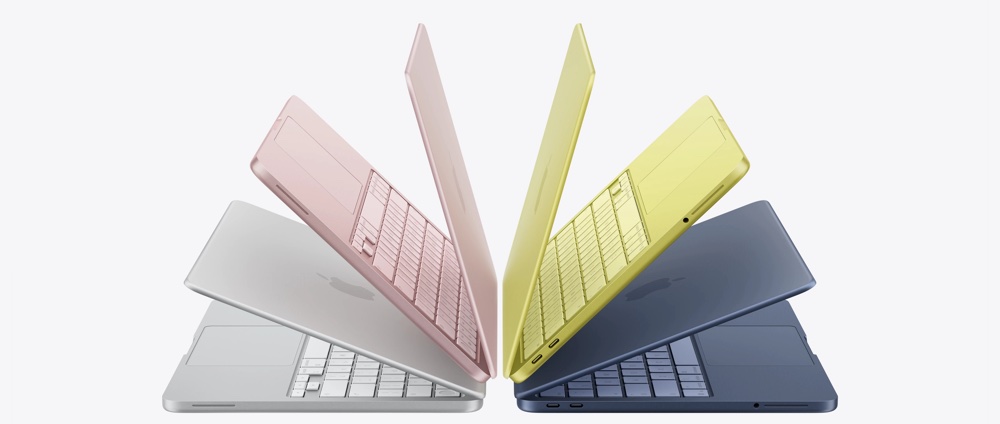
For some time now, my daily drive laptop has been a Windows PC. Back years ago when I was using a Macbook Pro, the Windows feature WSL wooed me back to the platform. It was nice to be back on familiar ground again with Windows, doing things I’d always done before (and running Total Commander natively). But, with the debut of the Macbook Neo, I turn my attention back to the Apple platform for a daily computer.
But let me step back for a second. What in the world would make me want to go back to a Mac? Especially the Neo. For a tech person like me, it’s like going backwards and getting an iPad with a keyboard. Have you seen the thing’s tiny motherboard? Surely, you’d think, as a power user, this machine would b e useless. I decided to challenge that notion and get the Neo to see for myself. The first and most noticeable thing was the keyboard. Something I’d remembered fondly and mostly hated on my Lenovo laptop – the Neo’s keyboard is a joy to use again. But, what what I found in the Neo was an Apple Silicon powerhouse capable of a ton, with power to spare. And this is all happening in the confines of 8 GB of RAM and a CPU they intended to throw away? Crazy.
Over time, I hadn’t really realized how much I’d been creeping further and further into the Apple ecosystem. AppleTV, Airpods, iPad, iPhone; I was ready to see what the addition of a Mac would do to make all of these come alive. This is where the audio had a chance to shine. With Airpods, the Neo switches between the phone and laptop in the smoothest hand off I think I’ve ever seen. This stuff is like magic and compared to the Bluetooth of the Windows world. This all just opened up a world of use for my Airpods that I hadn’t previously seen.
The size of the drive is also a key consideration. All you get are two options at Neo’s launch: 256 GB or 512 GB. For anyone looking to do anything useful, obviously the 512 GB is a must. One could use the smaller sized drive too, if you weren’t planning to use the machine like I was. Secondly, everything here is soldered down. The drive, the RAM, everything. There will be no adding to this computer. In my previous laptop, I replaced the RAM to bring it up to 64 GB.
So what do I like?
The screen is not big, but it’s plenty bright. Nice, clear and crisp on a sunny day. Of course I’ve mentioned the keyboard and without the touch bar, it so great to be writing on this keyboard again. The hardware itself has little more, two USB-C ports and a headphone jack. Everything else has to be Bluetooth. And that’s fine. Coming back to MacOS after so many years, there are some standout features that I’m loving in Tahoe too. The iPhone mirroring is fantastic, solid an frankly insane. Getting the ability to do text messaging and phone calls on the Mac again is also nice. I’m also finding that most of the stuff I relied on on Windows is also available on MacOS. Since Apple Silicon is mature enough, the only real holdout is my favourite application: Total Commander.
This brings me to one of the most important things I did on the laptop, namely virtualisation. The options there seemed endless, and I benefited from running many virtual machines at once. Now, it was rare and I knew it wasn’t going to be the case on the Neo, but could I at least run Windows and MacOS to test things as needed? The answer came with UTM. Universal Testing Machine (or UTM) runs natively on the A18 and can, of course run Tahoe without any issues (albeit slower). But, it really does get with Windows 11 on ARM. You aren’t going to want to emulate on MacOS, so running the ARM version and machine use of its ability to emulate x64 inside the OS is a boon. Most everything I need runs just fine there and the VM is speedy. I didn’t have options these great back on my old Macbook Pro.
Charging with USB-C is great too. I can even charge the thing with a power bank it’s so versatile. The battery life is so good. It just runs, sleeps, runs and the battery lasts all day. I still don’t feel that Windows PCs will ever be able to make power work so well and seamless (even though my Lenovo did an admirable job, there were episodes of power flakiness over its lifetime – until it just died). That’s all stuff I remember from my previous Macbook and it’s all still here. With my Lenovo laptop, I travelled with an AC adapter everywhere, with the Neo, it often leaves with no power cables to means to charge it. The battery just lasts.
What am I hating?
Hate is pretty strong here because there’s so much to love, but I do have some things I don’t like. The first, and main thing that will probably take me back to Windows is not being able to run a stellar terminal and file manager. For file management on the Mac, Forklift and Bloom look like great options and I’ll try them again. For a terminal session, the MacOS terminal is great, but having the use of a tool like MobaXterm on Windows is something I just took for granted. So far, I’ve been on the hunt for something comparable. Oh, and there’s a native port of Notepad++ (Update: It appears this project (now Nextpad++) is unauthorized, be warned – this has caused quite a stir). Are you kidding me? That’s the last thing I expected.
Of course, I don’t love the limited hardware specs. This is a great laptop at 8 GB of RAM, but if there was a 32 GB version, this machine would become all that much more versatile. I understand the price point needed to be maintained, but hey. The drive size is bearable for now, and that can be expanded well through external drive options anyway. The size is on the small end, but that also means the Neo is super light and easy to carry around. Your phone charger will probably also charge this computer.
Final Thoughts
After week, I gotta say I’m impressed. That’s no small thing. This is a fantastic computer and a great value. If you’re running a netbook or similar Windows device, this might be worth a look (especially if you spend most of your time with Office documents and web browsing). For the power user, there’s still a ton to love if you’ve got an iPhone and Airpods. In many ways, this computer is the resolution of a tension between what the iPad + mouse and what the Macbook should and could be. Expect it to be a success, but also expect Apple to launch more like this. The conflict (if you want to call it that) to resolve is whether the Macbook should have a touch screen. I say, no.
There will be more to say about this. Stay tuned…
Update: Here’s a really great deep dive into all things Neo. Since getting the Neo, I’ve added what’s being called the “thermal pad mod” to the laptop. Test the machine to see if performance improves.