iPhone Duo: A Costly and Bold Change from the Apple Standard
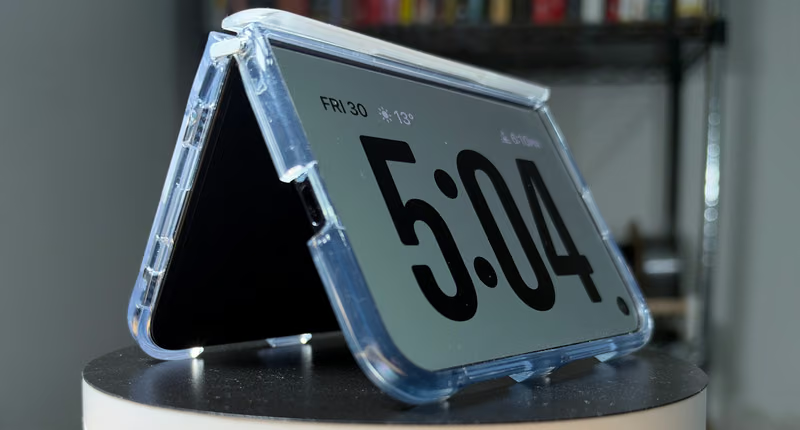 You may recall I had some initial thoughts about Apple’s new iPhone Duo device. There were gripes about the high price and really where this device stood up next to other foldables I’d used. Now, after spending a week with the iPhone Duo, I can relay what it’s like to use it as my daily driver.
Acquiring such a hard-to-get phone felt like a clandestine operation, I found Pamela aka “Sam” on Kijiji. She said she was willing to part with the phone for list price if I could get to her in Yorkdale’s Apple store within two hours. Others had been selling the hard-to-get device online for $200 to $1,000 in profit. I jumped at the chance and headed there. As she sat outside the store, Pamela already had an Apple bag in hand with an iPhone that wasn’t mine. I’m always on the lookout for scams, so if she’d already picked up the phone it would have been something of interest. We walked into the store and she started the pickup process. This was nice because coming right out of Apple stock meant that the phone would be 100% authentic. She showed her ID to them, got the phone and we finished the purchase inside the store (in front of an Apple employee). In all the years I’ve done this, this was a new one.
Just like the iPhone 18 setup process, two things stood out (outside of a seamless process): First, the new phone got insanely hot. The old phone stayed cool to the touch. Secondly, the eSIM transfer failed. It failed three times before working correctly. In the case of the 18, that transfer failed once and it didn’t seem to notable.
I also picked up an apple pencil but could not find a phone case in stock. Two days later (before my first drop), I picked up a case with a kick stand.
Physical Layout
The buttons are in different places. The power under the TouchID, the volume on top (as opposed to on the left). This was the biggest transition for me as I’d hunt for buttons, unsure of what was what. It was like I was learning to use an iPhone all over again. Of course, with a hinge on the left there’s no action button either. I found a few examples of shortcuts that could be added to the control center to replace what the action button did.
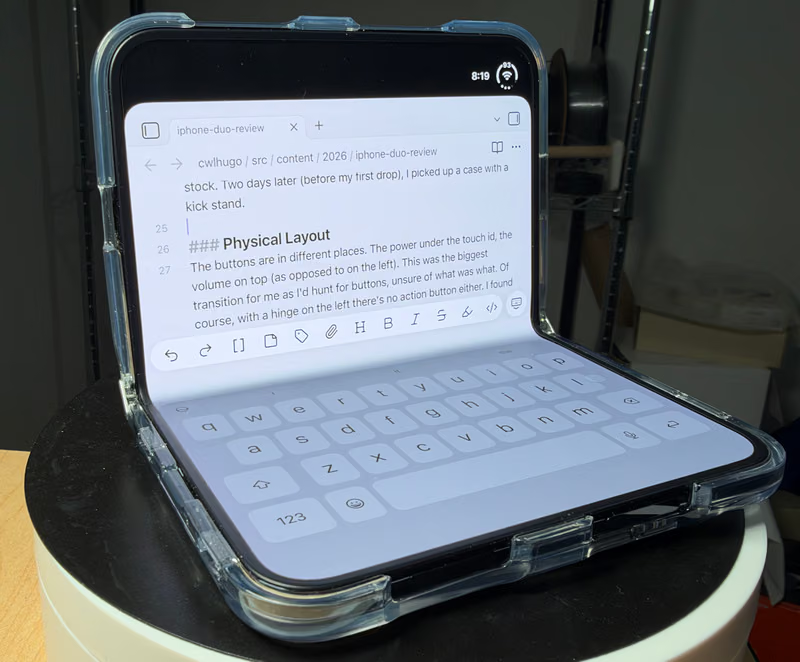 The unfolded keyboard is actually useful for a touch typist like me
As I’d expected, it was hard or downright impossible to get the phone unfolded with one hand. The upside to that is the hinge strength allows for cool opening positions including 90 degrees while sitting the table. In this mode the screen scrolls impressively through the crease area creating an effect most people love (when scrolling through photos for example). Outside of that it allows for a nice keyboard size on the bottom half while I type out text with two hands. As a single-finger typist this actually works well.
Apps Are a Mess
The lack of supported apps is quite noticeable. This runs from Firefox to Instagram to really any older program. This lack of support leads to a massive black bar on both sides of the screen and when unfolded. Sure, annoying but the expectation is that these apps will update over time.
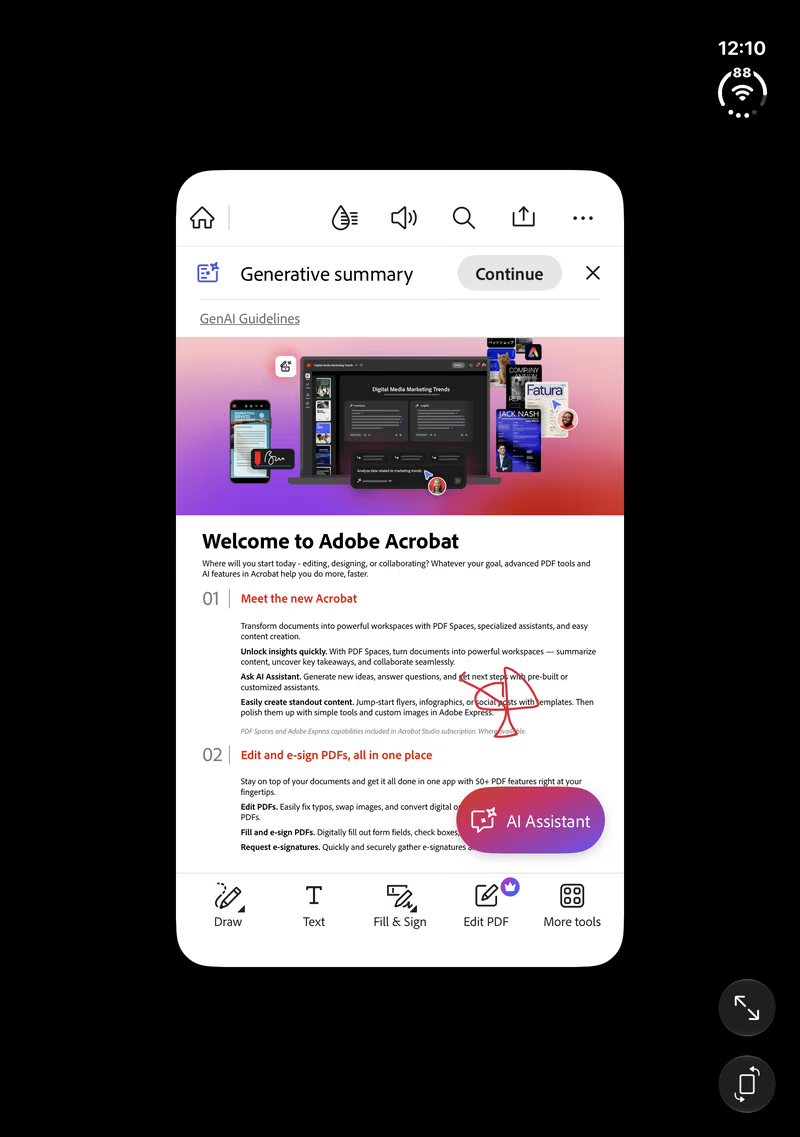 Adobe’s Acrobat Reader with the Duo unfolded (before they updated the app)
While working this review some apps were already great, including Obsidian and YouTube, but Acrobat’s reader was updated to utilize the full screen. Updates were coming in fast and furious. If I were to nitpick though, I’d note that the calculator app loads in full screen, while TikTok loads with a full black bar at right with X (formerly Twitter) loading a pseudo black bar but it moves the signal notifier up when a picture is loaded full screen. In short, apps are all over the place in style and structure.
The Camera System
Much has been said about the camera downgrade in the Duo and the lack of the telephoto or macro lenses. I will just say though, the 48 megapixel camera still gets some fantastic shots. The strange thing is that Camera settings only let you pick 24 megapixel maximum, but when inside the camera app, one can use the controls to bum the resolution up to 48 megapixel. Clunky.
Straight out of the camera though, the Duo does a very respectable job of capturing beautiful reds and yellows of our local fall foliage:
 A 48 megapixel example Image Click Here to see a larger image
No FaceID
One glaring omission is the lack of FaceID authentication. In its place is a fingerprint reader button on the right side of the Duo (when closed). This button also doubles as a power button. Coming from an iPhone 18 Pro Max, losing FaceID was a transition, annoying at times, but I got used to it. There are often whispers from folks who want TouchID back on the flagship iPhone, so I guess we can’t all be happy. Reaching for the reader does eventually become muscle memory - so it hasn’t been too bad.
Brilliant Use Cases
I saw this first on an iJustine video. She was using a Bluetooth keyboard while her iPhone Duo was attached to the back of a seat by way of her case. This appeared goofy and nerdy, but she kept typing away. What I’d done is far more small scale, but using a MagSafe mount and a Keys 2 Go keyboard with a phone mount and flipped open like a tablet. This gives you an incredibly large surface to type and view from. This is a killer use case.
Secondly, using the Apple Pencil to draw. The ability to mark up documents or draw on your phone is killer and the recent iOS 27.2 update enabled this feature with the USB-C version of the pencil. You my be an artist, and this would be great, but for most others, things like signing, marking up documents or simply just writing out notes are things that have never been possible on an Apple phone. Apps like TypeDraw take that concept and supercharge it.
But, in both of these killer use cases, one needs to lug around multiple potentially pricy things. Having just one of them with you won’t give the full power of what’s possible. But, with this smaller phone and, say, a keyboard, there’s more of a chance you’ll have this stuff when you need it.
Downsides (So Far)
One of the big uses I’d been excited for was having the Acrobat Reader application installed and then using the Duo and Pencil to mark up PDF files. This is possible, but the application was not yet optimized for the full screen. So, I was left to stretch the app out and seeing ugly visible black bars on both sides of the screen. Hopefully they get that fixed soon.
Things are so buggy that in one case I was placing a coffee order and needed to update my billing address. The blue checkmark that saved changes ended up hidden behind the connection circle. By opening the fold, I was able to access the checkmark and save. When you cant do what you need to do, that’s troublesome.
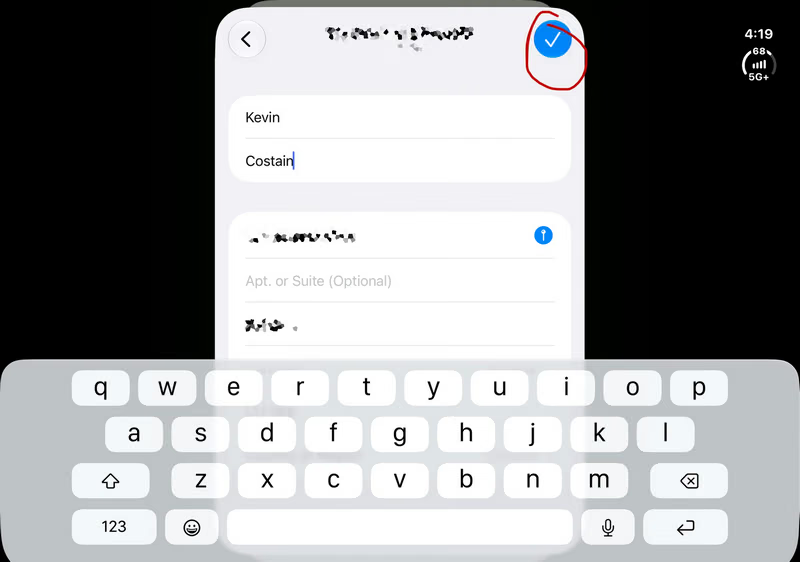 The blue checkmark control is obscured on the front screen, but clickable when the Duo is open (seen above)
The soft keyboard is different from the slab iPhone too. When the Duo is closed, I find myself hunting for the backspace key only to be hitting the letter L multiple times. That got annoying quickly. I’ve found the folded Duo’s screen to simply be a smaller edition of the large iPhone 18 Pro Max’s. And while that sucks for many reasons, it’s bearable. The upside is that my thumb can reach everywhere I want to tap.
Final Thoughts
For the first time in a long time people come up to me and comment or ask about my phone. Often it’s “Is that the Duo?” or “Oh, you got the Duo.” Bringing back novelty to Apple devices is a cool thing indeed. Just in case I hated it, I kept my 18 Pro Max available on standby for this week of use. I’ve seen some highlights and lowlights, but it was marked by spending most of it without a Duo case. Reckless? Yes, but I soon rectified that1.
Should you get this phone? Well, as The Verge describes this, it’s a phone in a test phase. If you’re into testing a phone that will likely change drastically next year and pay dearly for that pleasure, then yes; try and hunt one down. If not, I would say stick to whatever new generation phone you already own.
The big question I’ve had to wrestle with: Do I keep this phone or the 18 Pro Max? What would you do? I know that Marques Brownlee has given up the Dup to go back to his iPhone 18 Pro. My final decision was to keep the Duo and move on from that big slab.
-
Just about three hours before I dropped the phone on concrete. Thankfully, nothing was damaged. ↩︎