

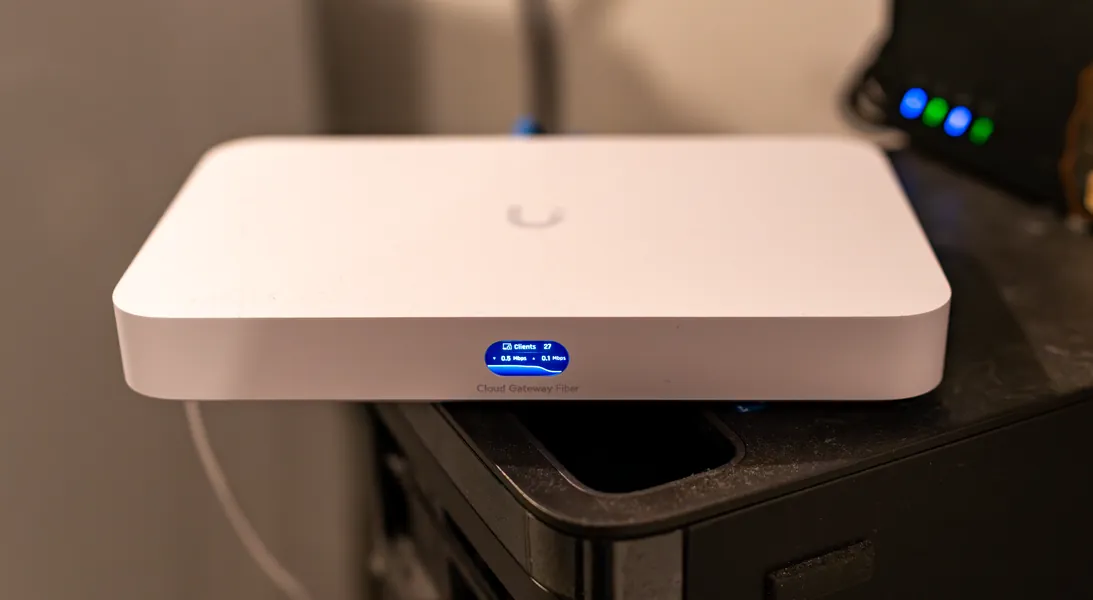
Unifi Cloud Gateway Fiber – is This the Perfect Gateway?
Ubiquiti Networks (or Unifi) have made a ton of different network gateway devices over the years, from the Dream Machine to the Dream Wall1, to the original UCG. These have all made full use of the Unifi Network Controller’s abilities. In the cases where you have no gateway device, the controller is great software, but having a gateway device on the edge of your Internet connection really gives you the full Unifi experience. Today, I’ve procured a Unifi Cloud Gateway Fiber and put it on the edge of a very active connection.
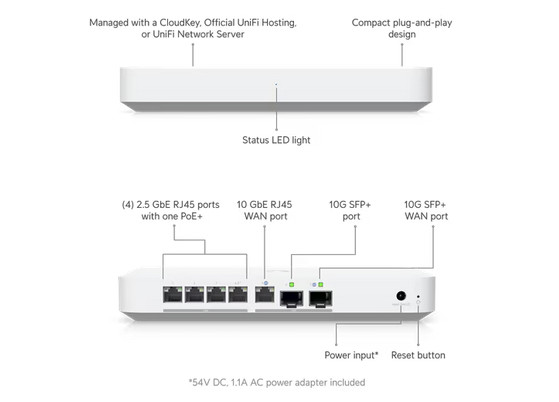
With the advent of ever higher internet bandwidth, many connections are well beyond 1 Gbps. The vast majority of older gateway devices cap out at a standard 1 Gbps link, and are ever further limited by router chipsets or the internal switching capabilities. If one wants to get the full bandwidth past 1gbs, it’s likely multiple network devices will need to change to 2.5gb or 10gb Ethernet. The good news in that much of this is reasonably priced.
Bell’s home hub router has been one of the bigger mysteries. Gone is the purple mode, for a menu driven bridge mode. For many though, Bells Home Hub and Gigahub routers can simply be connected to LAN and your PPOE login passes through. With each new gateway device Bell customers get, the cat and mouse in terms of bridge mode begins2. On the Rogers side, it seems things aren’t much better.
Why care about this? To get the most out of your Unifi gateway, it needs to be out on the Internet’s edge. This means removing the Bell or Rogers router entirely or bypassing it. It can work in other ways of course, but you’ll either sacrifice speed or functionally. For the investment in the Cloud Gateway Fiber, you want it at its best.
Form Factor
This thing is small. It’s about the size of a mini PC. It makes just about no noise. It will fit easily on the top of any rack or desktop. The ports on the back are incredibly configurable allowing you to make any one of them a WAN3 or WAN2 (fail-over) port. The inclusion of four POE+ ports also means you can attach cameras or access points directly to this device. It’s just about the perfect size to be the central hub of your small branch office’s network and security system.
Protect NVR
The Cloud Gateway can also run Unifi’s proprietary surveillance software, Protect. This, in conjunction with a growing set of different cameras allows for a ton of different detections, A.I. options and even license plate recognition. To make use of the NVR feature, however, you have to purchase a drive tray to hold a single M.2 drive. The upside here is that the drive access is fast, but the downside is there are no drive redundancies available. For those that have not used Unifi’s NVR software on a solid state drive, you’re in for a nice speed improvement. At the time of writing, the above mentioned SSD tray is $25.00. Given stock has been an issue in the past, one would hope that Unifi keeps this tray in stock levels closer to those of Cloud Gateway Fiber devices so anyone can get one. To be frank, this tray should have been included with the product. This kind configuration for small offices is the perfect sizing for speed, power and number of cameras supported ((15) HD, (8) 2K, or (5) 4K cameras, though you can push those limits even though you’ll get warnings). For a small installation of six mixed cameras and a 1 TB M.2 drive, you’ll get about 4 days and 12 hours of recording history.
Cybersecure
Given the name, you’d think this feature might be hokey or cheesy. But, it’s actually a useful and practical tool within the network controller. It’s capable of 5gbs bandwidth with the unified threat management (UTM) and Intrusion Protection System (IPS) turned on. One of things I appreciate is the ability to block connections based on region, such as that of China and Russia, for example. If you know specific regions are threat actors, this feature is a great way to be proactive.
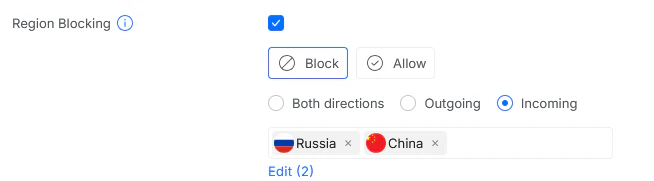
This, coupled with an intrusion protection system (IPS) with a number of pre-made signatures, and the Gateway Fiber blocks different attacks before reaching your systems. This is especially useful, of course, when you’re hosting services.
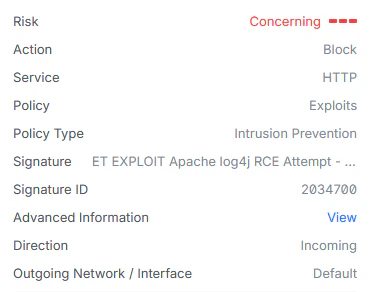
Over time, blocking events start to add up. Your mileage may vary for what should or shouldn’t be blocked, but this is should be a significant security boost for most self-hosted or small branch offices that might not have the capital to buy into larger protection systems.
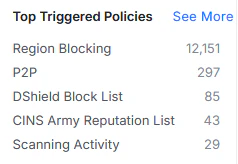
There are a ton more settings within CyberSecure that I won’t get into, but this Unifi device sure does pack in features for such a small package. You can get a more advanced tool from Unifi called “UniFi CyberSecure by Proofpoint,” but this one works well.
I just have to point out the beautiful work Unifi has done over the years to strike the right balance of readability and density of information in the mobile app. It works, and works well.
This device supports the full suite of Unifi software including Access, Talk, Connect and Innerspace, though I did not test any of those in this review. Installation and updates are like any other Unifi device, so this process is very predictable.
At an after-tax price of $473.47 CDN for the Cloud Gateway Fiber and the M.2 SSD Tray accessory, it’s more expensive than a low-end router, but as far as a feature rich UTM/IPS, this is great. That includes a network video recorder and identity manager software with no licensing fees, this is a more than reasonable cost for what you get. I should also note that the UCG-Fiber does not come with an access point, so it cannot provide wireless connectivity. To provide that, buy one of Unifi’s line of access point and adopt it into the network controller4.