Migrating a Large WordPress Blog to Hugo
 After seeing the beautifully created Excessively Adequate, I was inspired to move my blog out of WordPress and into a static site generator like Jekyll or Hugo. Let me tell you, this site has accumulated so much cruft just to make it look nice that it’s started to bug me. But with north of 800 articles, is a switch going to be possible? I’m not above a big change and big project, but this one seemed daunting to say the least. The switch to Hugo would also need to stay out of the GitHub environment. There was no need to have this site connected to GitHub or its tools, so Hugo seemed like the best bet.
Also the prospect of somehow drafting a post in Obsidian seemed like a fever-dream. And just to say, WordPress is 23 years old and has gotten out of control with garbage plugins and self-promoting crap on the back-end. WordPress also seemed to handle its database like the Windows registry: Just grow and grow with all the never-cleaned remnants of old software left behind. As version seven of WordPress rolled out, the state of this system has become too insecure and people have become too dependant on the ecosystem. There’s a place for that, but not on a site that’s primarily a blog like this is. It’s time to go back to basics.
 What WordPress/Engintech (top) and Hugo/Hextra (bottom) look like displaying code.
The migration would start with an export of content from WordPress into Markdown format. I found a WordPress plugin that would do this. The export is a little odd, by clicking on the menu item, you aren’t given an indication of what’s going on; but then the browser downloads a ZIP file of your blog’s content. It was looking good, so I started to think about how to set this up.
Installation
Installing Hugo on Docker was not perfectly straightforward. It seemed that I was going to need to build from a Dockerfile, or at lest, run some manual commands to get the container to load. The container wasn’t loading a config file, nor were the location of the Markdown source files clear. Over time, I came to understand this new way of working with a static site generator.
I found the Hextra theme, and I really fell in love with the look. The short-codes available were perfect for my content containing code.
The first template I tried failed to load. Oof. I found one that worked and started there. I found a way to get the slugs the way I wanted in posts. But, it seemed like the main page didn’t change with new posts. I liked how speedy things were. The theme I wanted was in Jekyll code and it would have to be ported. I wasn’t going to go there, but it was a start.
The folder and post structure
This was potentially a painful undertaking. The exported .MD (markdown) files made reference to images like: /wp-content/uploads/2021/04/Borland-Delphi.jpg
On Hugo, that image was located in: /2021/04/Borland-Delphi.jpg
So I would have to update all those references in the files. As the migration progressed, I would take the better part of a month and do a search and replace. I even did a regex on some tags, but more on that later.
Hugo and NGINX
Getting this working behind an NGINX proxy was another matter. Here was my site.conf:
server {
listen 80;
listen [::]:80;


   server_name stage.cwl.cc;

   root /var/cwlhugo/html/; #Absolute path to where your hugo site is
   index index.html; # Hugo generates HTML

   location / {
           try_files $uri $uri/ =404;
   }
}
This meant that my NGINX container had to see the root folder of the Hugo container (much like you see with fast-php). Once hooked up, I could preview site content from the domain stage.cwl.cc locally. I’d made some progress on the main screen also, now showing the 10 most recent posts and the title was set correctly by way of a “partials” file in the template folder. I created recent-posts.html and added this:
<h2>20 Most Recent Articles</h2>
<ul>
{{ range first 20 (where .Site.RegularPages "Type" "blog") }}
<li>
<a href="{{ .Permalink }}">{{ .Title }}</a> -
<span class="date">{{ .PublishDate.Format "2 Jan 2006" }}</span>
</li>
{{ end }}
</ul>
Then, to add this to the main page, I added a line referencing the partial file in the home.html file:
<div class="content">
{{ .Content }}
{{ partial "recent-posts.html" . }}
</div>
As I migrated each post to the new site, they were populating, but not automatically. I found by editing the Hugo config file ( in my case hugo.yaml), and saving it, the home page gets rebuilt by the server’s agent. I’ll probably keep the old site functioning for a little while and see where Hugo goes. I will still be able to edit from a mobile device, and it will just be within Obsidian’s umbrella this time.
With the exporter, I quickly came to see that it did not export content after the “more” tag - something of a remnant of my old site. So I had to go and remove the tag before doing a full export. I could get around this by adding a line to my theme’s functions.php:
add_filter( 'the_content_more_link', '__return_empty_string' );Now that only hid the “more” tag, but the export still left out bottom post content. So it was back to the drawing board. I set out to remove the more tag from each post, one by one thinking about how I might do this faster in the database. For now, this was what worked. I got through it in two days.
After getting the full content of post out, I had to make some basic edits, and then formatting. The hell of having to format all these posts was almost intolerable. Over time, there were so many tags overriding the theme and image links to all sorts off-page sites like Blogspot. This was going to need a full week of time to sift through all these posts.
As I moved over about eight of the older posts, it was clear that the content would need to be slowly cleaned up and rebuilt on the new Hugo page. This would take a heck of a long time for almost 800 posts, but on the bright side, it would give me a chance to revisit my older stuff and clean up any of the uglier content.
Scheduling Posts
Scheduling posts was another challenge - since Hugo’s a static site generator, I needed to have the server rebuild periodically. I looked to the variable HUGO_REFRESH_TIME to see if that would help, but it seemed to be attached to a docker image I wasn’t using. The idea is that when setting the PublishDate to a date in the future, Hugo will honour that and the entry when that date is no longer in the future (I.E. in the past). Making this more challenging, most of the explainer sites out there link this process to Github actions. I was solely running Hugo on on Docker and that was it.
This turned out be trickier than I thought.
First, I made a test post and set a future date as the date: in the frontmatter of the post. I checked on the site, the post did not publish. Good start. Then, from the docker host itself, I ran `docker exec -it -u root HugoContainer hugo list future'
Sure enough, hugo returned this result: `content/sch.md,,test,2026-05-29T20:35:56-04:00,0001-01-01T00:00:00Z,2026-05-29T20:35:56-04:00,false,http://stage.cwl.cc/sch/,page,'
That’s what I was looking for, so I waited until after the date I wanted and did a manual full build from the docker host to see if the post would go up;
docker exec -it -u root HugoContainer hugo build
It posted. Amazing. So on the bare metal docker host, I setup a cronjob to run at about 10am. Adding this to the crontab.1 : `0 10 * * * docker exec -t HugoContainer hugo build'
As a nice bonus, the Hextra theme also read and responded to the modified: entry in a post’s frontmatter and updated that date on a post’s bottom-right. While I was writing this article on WordPress, I took it over to Obsidian to finish. This would create a bit of a hybrid situation, but it wasn’t too painful in the end.
In Obsidian, to Preview Images Inline
Linking this up with Hugo needed a similar folder structure on the Hugo server at /src/static/images as would be used inside of obsidian at /images. Then when referencing images in Markdown source content, both would allow me to preview the article before posting it. This super-simple way of handling images meant that I needed to (in a rather clunky way) upload files to the server and keep them in the Obsidian folder. Annoying, but maybe a sync task could fix that in the future.
Removing Extra HTML Tags with a Regex
In too many of the old blog posts there were nasty span and div tags littered all over. To combat this, I used Notepad++ and a regular expression to delete all occurrences of them. Use the Replace function:
find: <(span|div).*?>|</(span|div)>
replace with: {empty}
Search Mode: Regular Expression
You can remove the div or span, or add other tags if you’re going to use this expression yourself.

The Home Page
To bring all this together, I needed to code the basic look of the home page and its article listings. This was perhaps the most difficult to get right for me. Couple that with the fact that a full Hugo build had to happen to refresh the page. To get started, Ashik Nesin’s article gave me some ideas on how to build in recent posts. I took that and expanded on it in my own way. That effort was focused on a partial file in Hextra’s theme folder and was something I’d change every day trying to get it just right.
Opengraph
With the root page taking shape and I’d gotten about halfway through the process of reformatting old content, I turned to trying to build all the meta information as it existed on the old site. It wasn’t clear if I needed to edit theme data or not.
Since this was controlled in the theme, the file in Hextra most important to that was themes/hextra/layouts/_partials/head.html - and this file calls a bunch of partial files from here:
  {{- partial "opengraph.html" . -}}
  {{- partial "schema.html" . -}}
  {{- partial "twitter_cards.html" . -}}
These files appear to call Hugo’s build in stuff for handling this. In my case, I overrode this by adding my own twitter_cards.html in Hugo’s root /layouts/partials directory. I then added a couple items, no doubt I will add more when the site is live and I can test it.
  <meta name="twitter:site" content="@cwlco" />
  <meta name="twitter:creator" content="@cwlco">
Taxonomy
I’ve also wanted to make use of the taxonomy system and display categories that were set for each post and sitting in front matter. Thsi took a little doing, but I managed to add the categories for each article inline next to the publish date. Here’s what I did.
First, I created a file name cats.html in the /themes/hextra/layouts/_partials directory. This included the following code (ripped and slightly modified from this helpful site):
{{ $taxonomy := "categories" }} {{ with .Param $taxonomy }}
<ul>
  {{ range $index, $tag := . }} {{ with $.Site.GetPage (printf "/%s/%s"
  $taxonomy $tag) -}}

    <a href="{{ .Permalink }}">#{{ $tag | urlize }}</a>

  {{- end -}} {{- end -}}
</ul>
{{ end }}
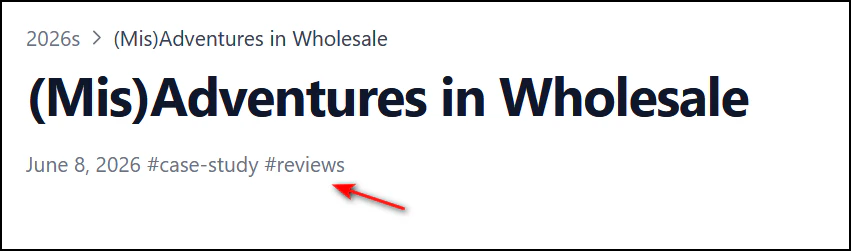
With this code, it takes each category it finds referenced in the article’s front matter and displays it with a hashtag character in front of the reference. As is probably obvious, it was intended for tags, but I changed that to categories - I could further change variable names to clean it up later, but this works. In addition, this code will hyperlink to the category page when clicked.
Next, I add a partial calling the cats.html in /themes/hextra/layouts/blog/single.html, targeting just after the date:
 <div class="hx:mt-4 hx:mb-16 hx:text-gray-500 hx:dark:text-gray-400 hx:text-sm hx:flex hx:items-center hx:flex-wrap hx:gap-y-2">
          {{- with $date := .Date }}<span class="hx:mr-1">{{ partial "utils/format-date" $date }}</span>{{ end -}}

 {{ partial "cats.html" .}}
When a post has categories in the front matter, it looks like this:
Keeping Hugo Running Through Updates
As I’d be editing a ton of files and theme info, I was hyper aware of needing to be careful with updates to both Hugo and the Hextra theme.
As I was migrating, Hugo’s docker container had an update, so I’d be able to test that. After backing up Hugo’s data volume, I updated the 500 MB docker container and the site came back online with no issues. There were no Hextra updates yet, so that will be a test for another day.
Other, smaller stuff
I added a reasonably nice way to attach captions to images while also centering the captions and bringing the font size down. This allowed me to call in markdown simply:

*Caption*This is done in my theme’s custom css by overriding the img+em tags thusly2:
img + em {
	display: flex;
	text-align: center;
	justify-content: center;
	align-items: center;
	font-size: 15px;
}
The three files I kept open the entire migration: /themes/hextra/layouts/_partials/recent-posts.html /hugo.yaml /themes/hextra/assets/css/custom.css
Issues
While working with Hugo and Hextra, I did come across some challenges. The biggest challenge was when Hugo started to build type: page markdown files with four lines of blank space. I went crazy over this until I deleted hextra’s theme folder and placed the original files back. Slowly, I then edited any files I’d used previously and pages were rendering correctly again. it seemed for a while that the culprit was Hugo, but that was not the case.
What I’ll Miss
The editor in WordPress was a far better experience for the most part because I didn’t have to remember short codes and style marks. I realize also that the podcast that sat hosted on this site will go away. I walked away from that so long ago that it was time to let it go. Secondly, the nice auto mailer I’d found called MailPoet would also go, since that’s WordPress only. I’d have to go back to the drawing board on solving the issue of mailing people when an article is published. The platform I used previously was SendFox and that may be a workable solution, but given that its RSS features seem to be broken, it might not work out. It’s useful to update people when a new post is out, so I wanted to keep this feature.
Of course, the prospect of drafting and publishing this very post in Obsidian was exciting. I’m happy to say these very words are being written in this great tool.
Ending After the Switch to Hugo
This will also mark the end of this blog supporting comments. There’s been a long-standing love/hate relationship with them, but it was time to go. Most of what comes in is SPAM and the days of active commenters on the web seem to have taken a back seat to other venues, rage baiting and AI summaries prompted by another AI. You, of course, can always contact me and I welcome it. Sometimes, I add comments you send in to a post update or invite them to guest blog.
Internal podcast stuff is also going to drop off. None of that has seen an update in many moons. The WordPress plugin supporting it seemed far too bloated for what it was doing. Buh-bye. The podcast itself, maybe one day it comes back. There were some dangling pieces of WooCommerce and plugins used but removed. That will all go away.
Final Thoughts
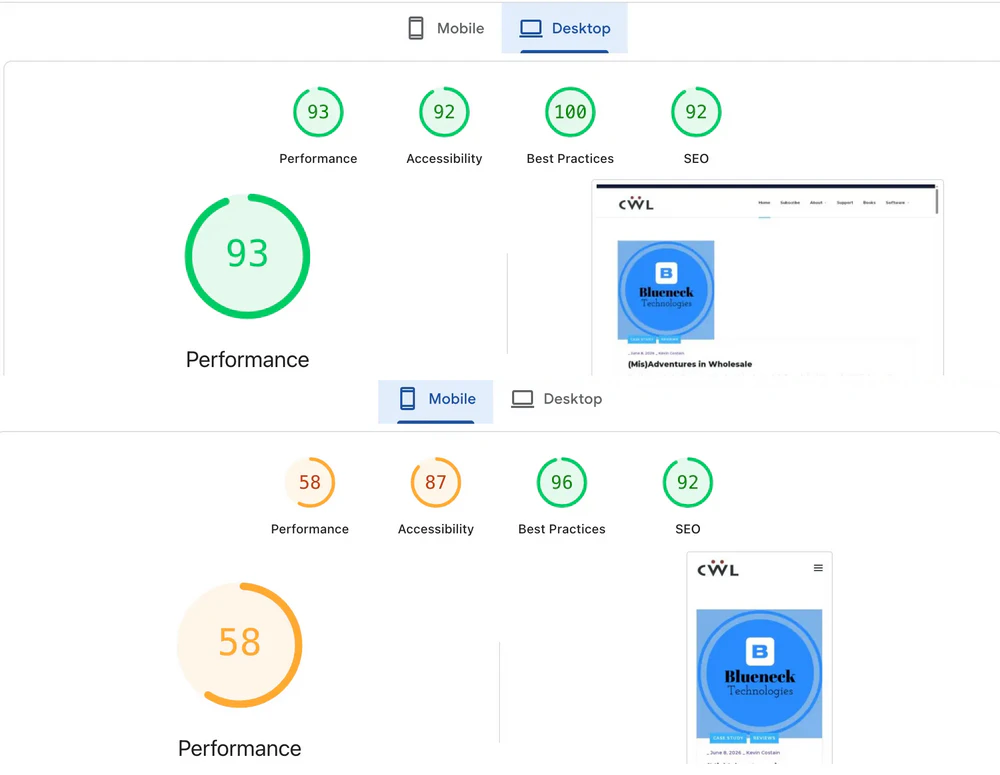
Once it was all done, it was time to take Google’s PageSpeed Insights and compare it to the previous site iteration. Here’s where the site was at before the update:
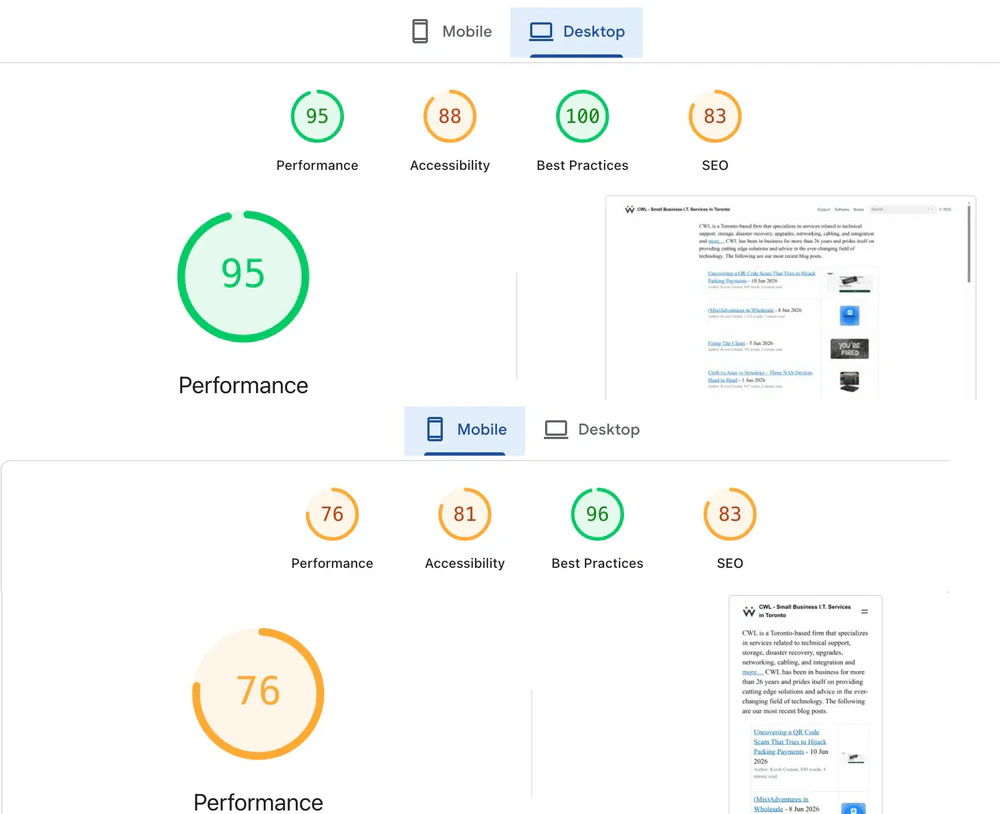
After the update, this page saw some significant gains in mobile performance.
There is still work to do, but this site should be faster, smoother and more interesting (doubt it, but one can hope). This has been a massive weeks-long marathon and it feels worthwhile so far. Time will tell. Get in touch and let me know what you think.