


Removing Archive and Tag Pages from Search Engines
As my WordPress journey continues, there are more frontiers of pressing this platform to work better internally, and play nicer with the outside. The problem I set to tackle today related to the glut of cwl.cc page references found on search engines that were of no value outside. How was I going to remove these in the most elegant way possible? In 2015, I actually covered this solution, but ten years later, I came at it again with a new theme and fresh eyes. Of course, the search engine did not surface my previous answer Turns out, I managed to improve on my solution, but it gives me a chance to peek into my process.
One important thing for me to reckon with was that WordPress creates these pages at will. There are category pages, tag pages, and even pages that reference years, and ones that reference months and years. Of course, then there are the pagination pages (if you have that setting on). There are pages for taxonomy and even nested pagination. One just thinks that an elegant solution within WordPress would be to make all of these pages un-indexable to search engines by default. This is all functionality built into the software and platform to help users find or reference content easier. It’s built-in to WordPress. While they may be useful internally to the product and a user, they hold no value inside a search result. Search results like this on DuckDuckGo we’re driving me crazy:
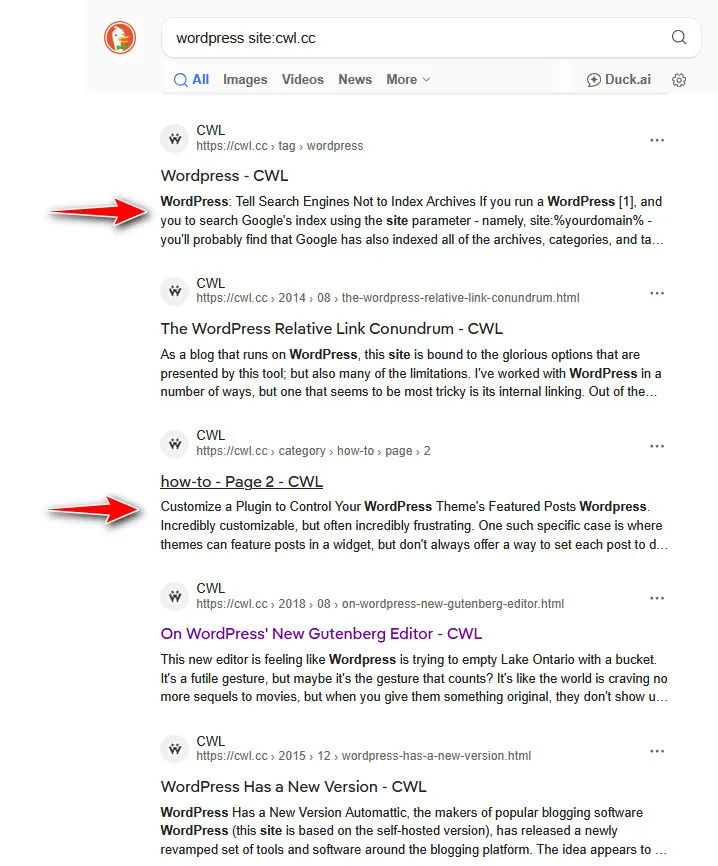
Starting fresh again, one of the first crumbs I found was the ‘noindex‘ meta statement. As often is the case, I found it on StackExchange. I knew of this, and it seemed to be useful, so I copied it and placed in a text document to start with. I wasn’t yet sure how it fit:
echo '<meta name="robots" content="noindex,follow" />';Though this one solution presented itself as perhaps going 404 on those archive pages. Found on barattalo.it, the solution was to place this in the index.php of my theme. This wasn’t working so great at the start because the code on that page incorrectly translated symbols, but it also felt like I was aping WordPress and removing functionality. This wasn’t right.
Ok, what about the .htaccess file and doing redirects? I’d done that in the past to help search engines understand new locations of content. This file, as you may know, sits in the root of your Apache web server. I started to add statements like this:
RedirectMatch 301 ^/portfolio/.*$ /gallery/
RedirectMatch 301 ^/author/.*$ /
RedirectMatch 301 ^/category/.*$ /
RedirectMatch 301 ^/tag/.*$ /
RedirectMatch 301 ^/20.*$ /
Again, I was taking away functionality, but, as I’d find out quickly, this site was running FastCGI and thus not reading the .htaccess file. No, this also wasn’t going to work, and it certainly wasn’t elegant.
I went a little higher, into the reverse proxy, Nginx. Surely I could use a regex statement inside of a location reference, this would redirect pages that weren’t needed. The location statement looks something like this:
       location = /2025 {
          return 301 https://cwl.cc;  }
That was working as intended, but it was again a blunt object smashing apart useful functionality. In one location statement, I when after the date pages and in effect started redirecting content like images also. The result mangled the blog and threw a bunch of errors. Nope, this was a non-starter.
Finally, It comes to me (even though it was always on my site)
Back to that meta tag, I thought about it. What if I just placed that tag on all the pages I don’t want indexed, and leave the pages I wanted searchable? WordPress didn’t have to break, this would be more elegant. How this is done is targeting the header in much the same manner you might target the open-graph. On this site, there’s a child theme and in that child theme (and main theme) is a header.php file. You’re mileage may vary, but look for that file and make copy in your child theme.
There, the magic of selecting pages and adding the meta tag has to happen. Here’s what I started with (place it just after the <head> tag):
<head>
  <?php
   if( is_archive() ) {
     echo '<meta name="robots" content="noindex" />';   }

   if ( is_paged() ) {
     echo '<meta name="robots" content="noindex" />';   }
  ?>
After adding this, you’ll want to start testing your site. Load page references and “view source,” then load blog content and “view source.” You want to make sure the meta tag appears in the right locations and not on page or article content. If you view source here, you’ll notice here, I’ve also added “follow,” and that’s a trust reference, not absolutely necessary for you. The two boolean test there are is_archive() and is_paged(), they test for archive and paginated pages respectively. These two pick up just about everything that is not content including author pages.
Taking it further, there’s one tricky situation with that, and it’s the paginated tag pages. Whoa this goes a little crazy, but in those cases, this code will add two meta tags to the output. We want to account for that. So, I nested an if statement and it looks like this – now leaving only one noindex tag on those special pages:
<head>

  <?php
    if( is_archive() ) {
      echo '<meta name="robots" content="noindex,follow" />';
    }

    if ( is_paged() ) {
      if(is_archive()) {
       }  else { echo '<meta name="robots" content="noindex,follow" />'; }
    }
  ?>
If anything else comes to mind, and probably will, I’ll update this article. Suggestions are always welcome.
Search Engine Effects
Search engines don’t respond very quickly. So, I’ve had to let this article percolate until there were some results from this change. Starting Nov 12, 2025, it took until (date) before I noticed a change.
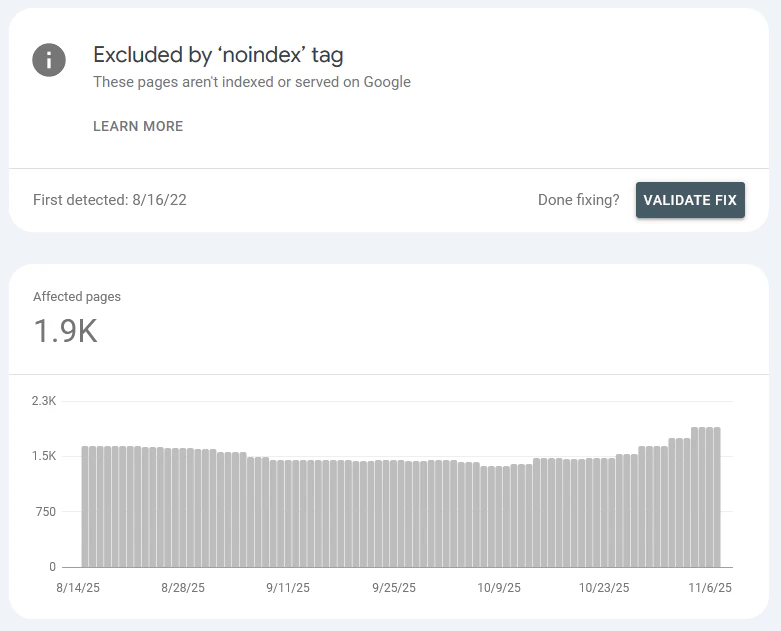
By November 13, Google’s Search Console was showing signs of recognizing the noindex tag:
If you’re into SEO, I’d love to hear more about how you solve this. Comments will be on for a short time.