

I’m always looking for new and interesting tools or utilities. Every day I come across a number of these useful programs and look forward to sharing them with you. In this series of blogs I’ll go over some of the best and most interesting I have found and tested – I welcome you to go […]
I’m always looking for new and interesting tools or utilities. Every day I come across a number of these useful programs and look forward to sharing them with you. In this series of blogs I’ll go over some of the best and most interesting I have found and tested – I welcome you to go try one of them and let me know what you think!
Apple’s iPad is the new tablet/slate computer that will provide a new touch-based experience that will play movies, music be a book reader and run most of the applications written for the iPhone.

What many do not know, however, is that the PDF format is so mature now that many of these things you do (and often pay for) can be done without the use of the often slow-and-bloated official applications or can be done completely free.
You may have read my previous post on Ubertwitter’s new beta version for the Blackberry. Well, Ubertwitter was nice enough to get me a newer version of this application (that will be released in early January). Here is another look at what this application is all about and some of the new-newer features.
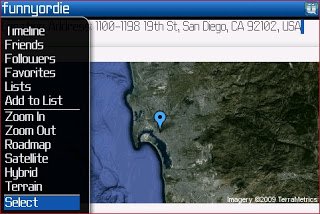
I just heard about this – a newer version of Ubertwitter that supports Lists and more features? if you haven’t seen it or heard about it – you’ll want to download this version with your blackberry (Over-The-Air) right here. I thought I’d give you a look at some of the improvements and changes in this version with a few screen shots. Please keep in mind this application is in Beta, so treat it as such.

Today, I’m going to look at a small utility that acts simply as a Print Manager or a Print Previewer. This utility gives you the ability to print ONLY the pages you need or want to print and remove the ones you don’t need. This is such an important function on a computer, I’m not sure why everyone doesn’t do it – and what’s more – why the current version of Windows doesn’t include this utility!
You may have heard or seen the recent controversy related to Fusion Garage’s JooJoo/Crunchpad that was demoed yesterday. I’m here to tell you it sucks.

I’m always looking for new and interesting utilities. The Internet is a wealth of these utilities and many of them are free. In this series of blogs I’ll go over some of the best and most interesting I have found – I welcome you to go try one of them and let me know what you think!